For Windows 10 and 11
Drag. Press Shift.
Done.
Sunflower converts and edits files the moment you drag them. Start dragging any picture, PDF or Word file, press Shift, and drop it on a slice. The result lands right next to the original.
Works offline · No account · Your originals are never changed

Three moves. No windows to dig through.
Sunflower lives quietly in the tray. It wakes up only when you need it, right where your file already is.
Start dragging
Any picture, PDF, Word or text file, in File Explorer or on the desktop.
Press Shift
A glass menu opens under your cursor. Tap Shift again to switch between Convert, Tools and Studio.
Drop on a slice
The new file appears next to the original, with Open, Show in folder and Undo in the notification.
One menu. Three rings of tools.
Sunflower only shows what fits the file you're holding.
Convert
JPG, PNG, WebP, HEIC, AVIF, TIFF, BMP, GIF, ICO and PDF. PDF to pictures, Word or text. Word and text to PDF. Several pictures into one PDF.
Tools
Compress, resize, crop and edit pictures. Annotate, redact, add a background, remove GPS location. PDFs: compress, split, merge, rotate, password-protect, extract images.
Studio
Scan fix, Cut out, watermarks, rounded corners, icon sets, page numbers, PDF signing and document packets.
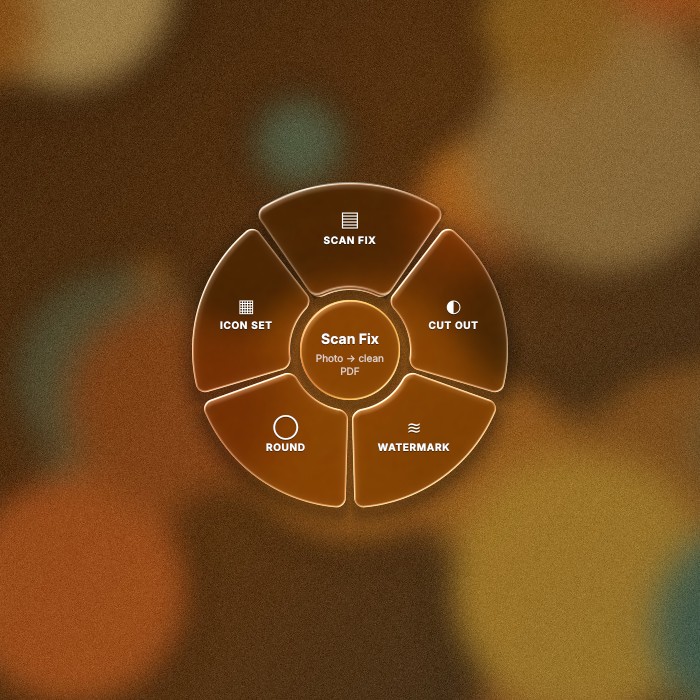
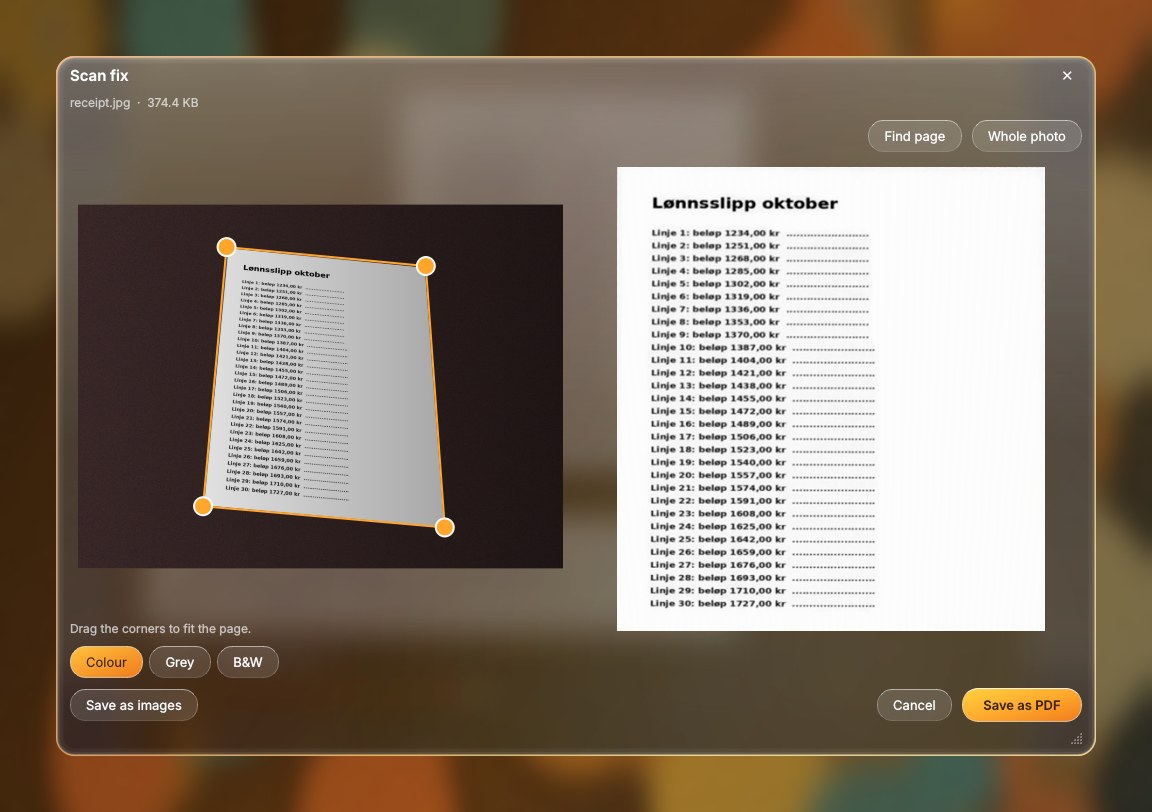
Scan fix
Phone photo in, clean PDF out.
Sunflower finds the page, straightens it, removes shadows and makes the paper white. Choose colour, grey or black-and-white, and drag the corners if you want them exact. Several photos become one PDF.
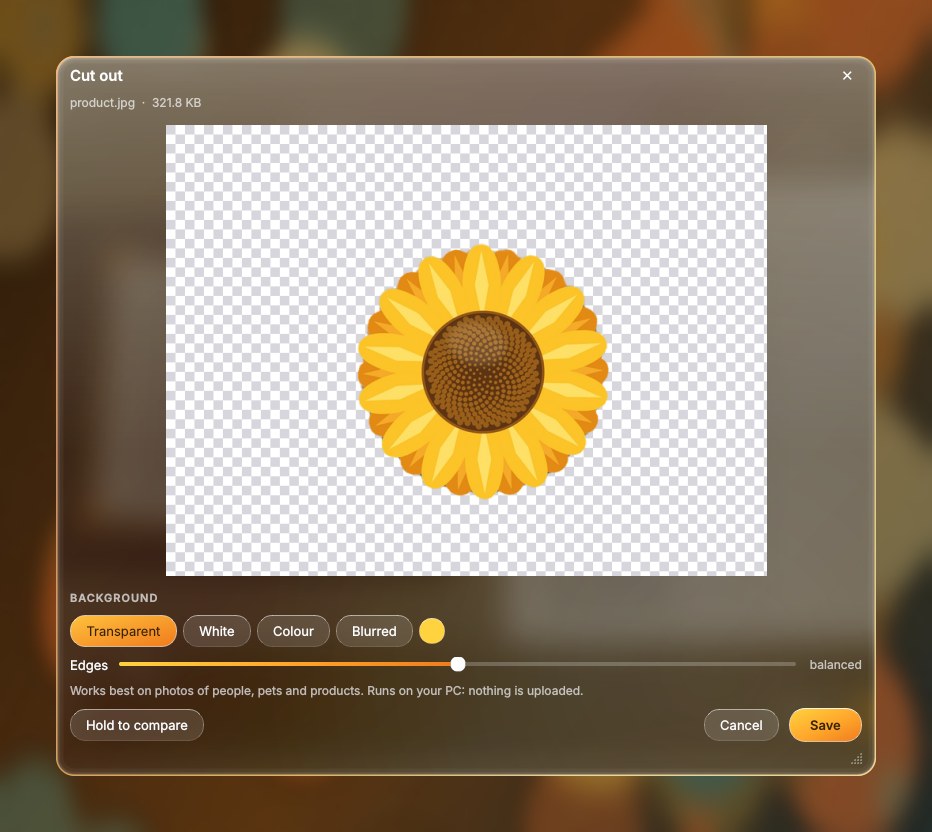
Cut out
Remove the background. Offline.
Built-in AI finds the subject in people, pets and product photos. Keep it transparent, or put it on white, your own colour or a soft blur. It runs on your PC, so nothing is uploaded.
Sign
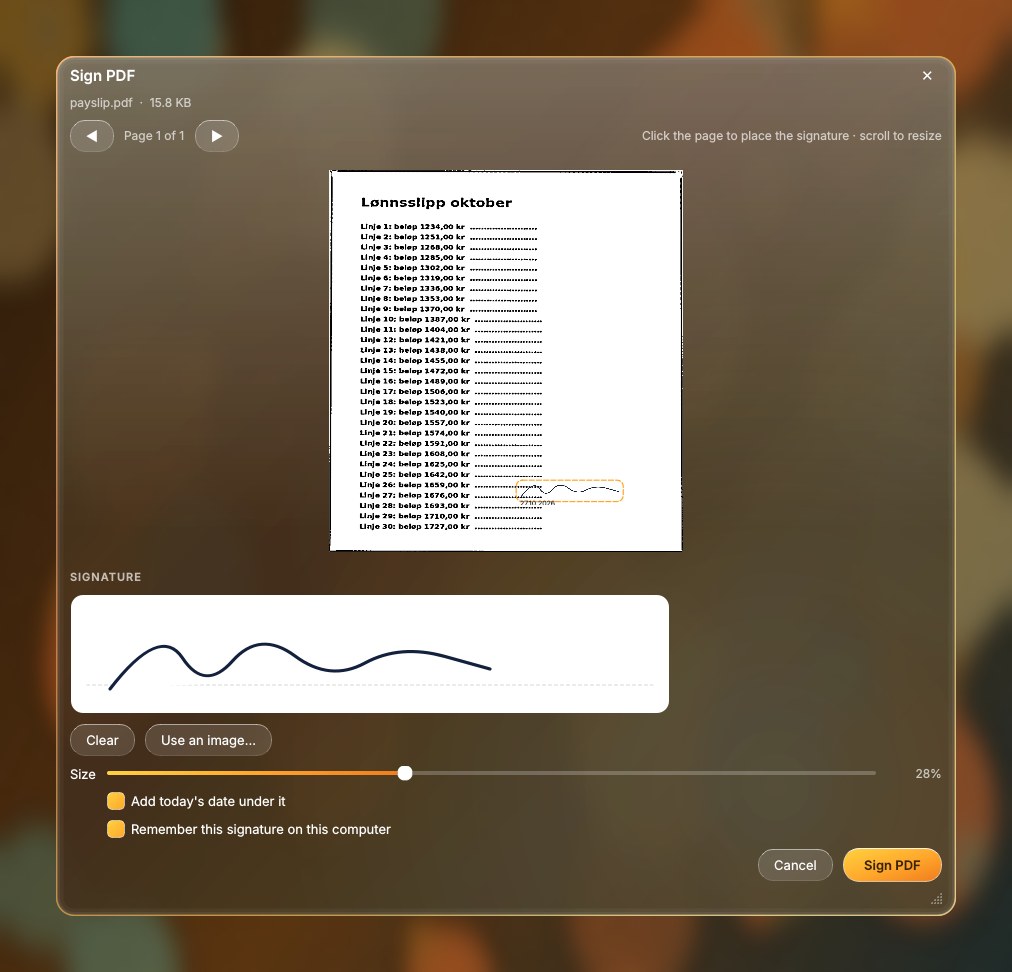
Sign a PDF without printing it.
Draw your signature once with the mouse or a pen, or use a photo of it. Click where it goes, add today's date if you like, and Sunflower remembers it for next time.
Document packet
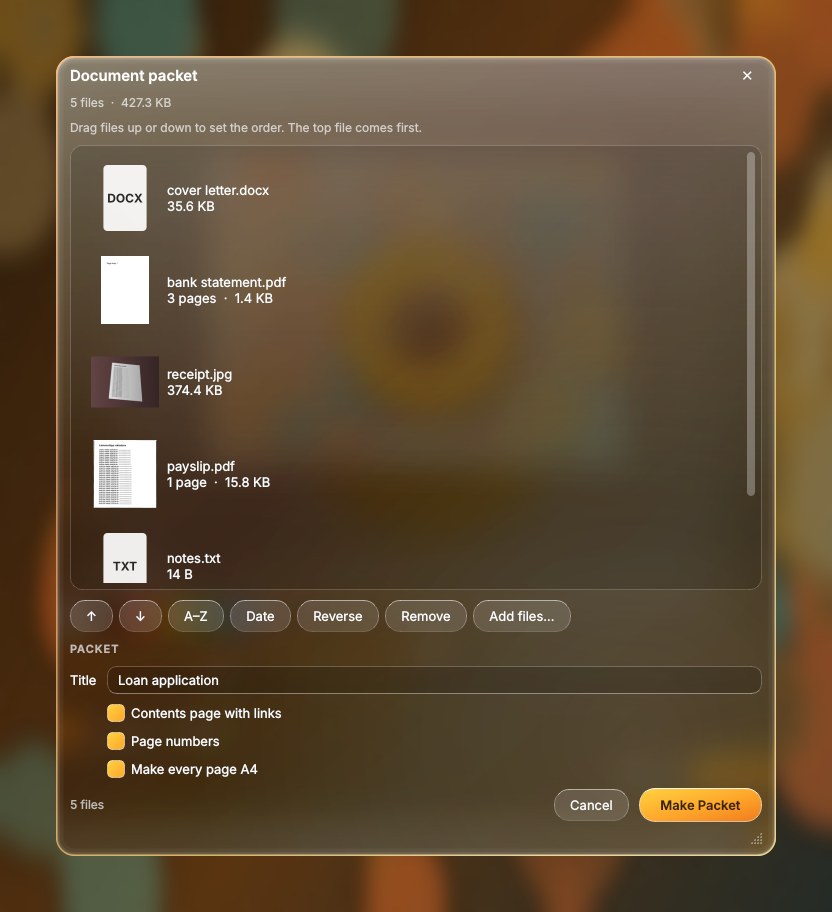
A pile of files becomes one tidy PDF.
Drop pictures, PDFs, Word and text files together and drag them into order. You get one PDF with a clickable contents page, bookmarks, page numbers and every page in A4. Ideal for applications, claims and reports.
Watermark
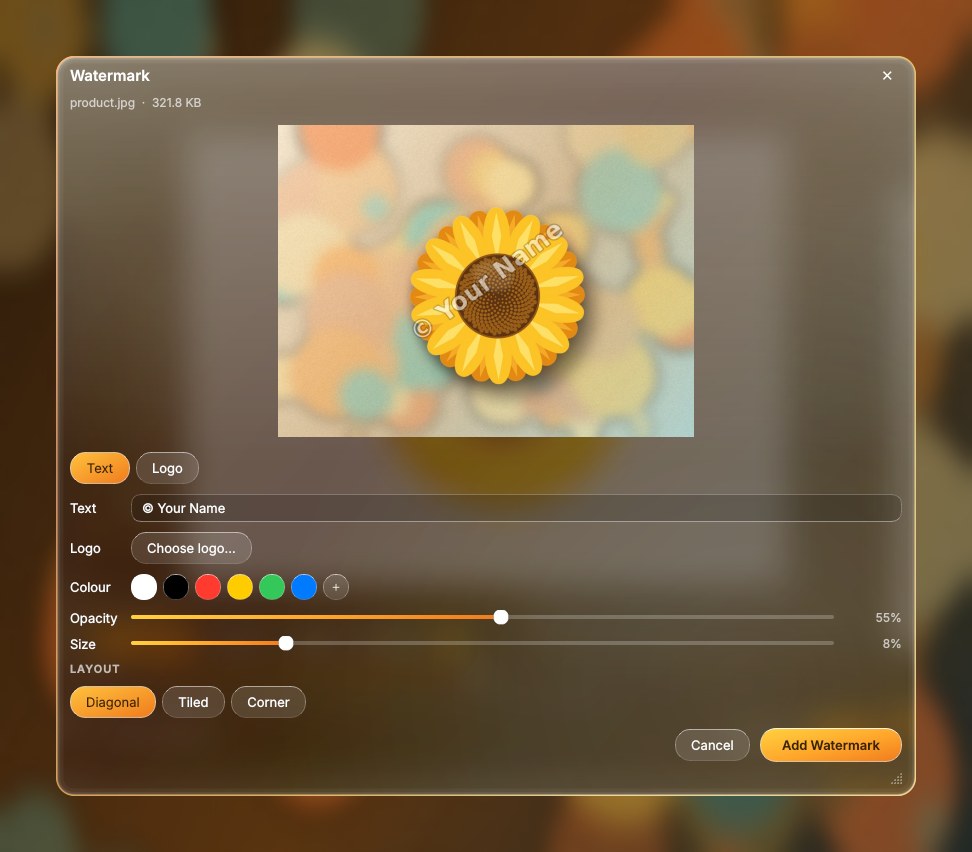
Mark your work in seconds.
Text or your logo, across the middle, tiled or in a corner, on pictures and on every page of a PDF. Set the colour, size and opacity with a live preview.
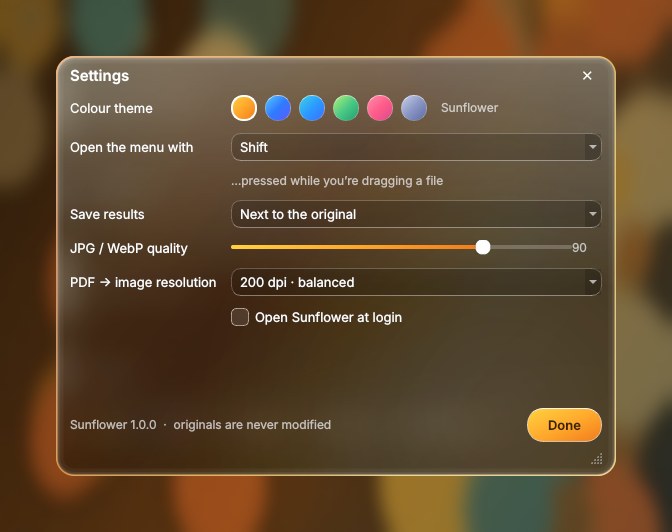
Make it yours.
Six colour themes for the menu, windows and notifications. Pick Shift, Ctrl or Alt as your key, and choose where results are saved.
Your files never leave your PC.
Everything happens locally
Converting, scanning, removing backgrounds and signing all run on your computer. No uploads, no cloud.
Originals stay untouched
Every result is a new file next to the original. Changed your mind? Undo sends it to the Recycle Bin.
No account, no tracking
Sunflower collects nothing about you or your files. Read the privacy policy.

Get Sunflower
Every feature in one app, with updates through Microsoft Store.
Coming soon
Launching on Microsoft Store
- Convert, Tools and Studio, all included
- Scan fix, Cut out, Sign and Document packet
- Works offline on Windows 10 and 11
- Automatic updates from Microsoft Store
Questions
Which Windows versions does it run on?
Windows 10 (version 1809 or newer) and Windows 11, on 64-bit PCs.
Do I have to drag files? Can I also right-click?
Both work. Right-click a file and choose Open with → Sunflower, or double-click the tray icon to pick a file. The same menu opens.
Does Shift interfere with normal dragging?
Only while you're holding a file. If Shift clashes with how you work, switch the key to Ctrl or Alt in Settings, or turn Sunflower off from the tray.
Which files does it understand?
Pictures (JPG, PNG, WebP, HEIC, AVIF, TIFF, BMP, GIF, ICO), PDFs, Word documents (.docx) and text files (.txt, .md, .csv).
Is anything sent to the internet?
No. All processing, including background removal, happens on your PC. Sunflower has no account and no tracking.